Keylogger LITE V4 Activation (Registration)
Open the main Keylogger LITE software window. Click the upper menu "Help" and choose "Registration".
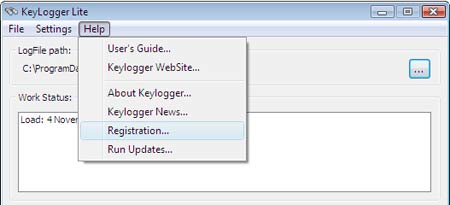
At Keylogger Registration window You will find your personal unique - just for this computer - Registration Code. Learn more about the activation process using this Registration Code You can in Purchase area.

Activate (Register) Keylogger Lite by entering your personal Activation Code: 6 digits that You get generated on site at the end of payment process. You must enter these digits into "Activation Code" field and press "Register" button. When You buy Keylogger Lite through electronic payment systems - please, send us your personal Registration Code.
Attention! Each OS Windows generates a unique Registration Code after the software installation: a new OS Windows shows You a new Registration Code that must be activated independently. Remember that OS Windows re-installation and a new Keylogger Lite installation inside this system same as changing your computer hardware causes a new Registration Code generating to be activated again.
If You use all 4 tries to enter Activation code using wrong data - the software blocks and You cannot use it inside this system. All You can do is to reinstall OS Windows and repeat with Keylogger Lite using the right Activation code. Please, Be carefull entering your Activation code! These limitations are absent in more fresh and progressive software - Keylogger NET4 - with more beautiful Viewer (LogFile), more automated software set-up, with the possibility to switch your Licence to another Keylogger inside other operational system or the same computer after OS Windows re-installation. Please, feel free to contact Keylogger Technical support department if You get any error or problem while installing, activating or using Keylogger.